type='text/javascript'/>

Tuesday, October 19, 2010

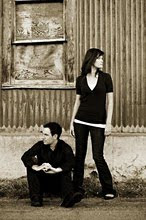
Family Photo Shoot

I have been wanting family photos for months now and then one day last week I told Dan that he better go and get a hair cut before he comes home cause we are going to be doing a family photo session later that day. Being the awesome husband that he is he got one. :) I have been bugging him for a while now. :)

Here are some of my favorite ones.


Here are two of my favorites. If you want to see more go here. It's a little surprise if you go there. :) I've been putting off getting this up and ready for awhile now... like a pregnancy, and a new baby.... and no motivation, which has changed. Hopefully you enjoy it. If you go here you see the whole site.

It was a pretty fun photo shoot. I set up my camera on my awesome tripod that my Dad and Veniece got me for graduation and then had to go back and forth between each shot to set the camera off. I believe I did a pretty good job with the images. I really do need to get a wireless release button. Oh well the images turned out fantastic and now I have two hanging up on our new family photo wall. 

Peace.

Michelle


Friday, October 15, 2010

Fix-It-Friday No. 4


I did it again, I heart faces' Fix-it-Friday. I knew i would be working on the activity this morning because all of our principle architects are out today. HOORAY!! I send everyone to their voice mail and no busy work from them :)

Well lets start the show.....  i know everyone one is seated at the edge of their seats waiting for my wonderful images.... Na I'm just kidding. (I hope you all heard the sarcasm in that sentence) :) I also have a treat for everyone... meaning the three people that read this site... I have not one image to show, you but two. that is right TWO.... woo hoo...

Here is the originial


Here is numero uno..


Work flow

I did almost the same thing i did with my photo fix No 3.

I duplicated the background layer twice
changed one layers blending mode to screen and the other to soft light

 Here is what i added

I used a curves adjustment layer. ( for those of you that don't know... an adjustment layer is the circle at the bottom of your layers palette that is half black and half white.)

and pulled the line, right in the middle up a little to give the straight diagonal line a small curve upwards.

I then created another curves adjustement layer to make the coloring.
I played with the different color channels. Red, Green and Blue
I just took screen shots of what i did instead of telling you. You can go into each channel and duplicate the line.

Red Channel


Green Channel


and Blue channel


Now play with the channels and make it your own.

If you like what you see keep your opacity at 100. I changed my opacity to about 75.

I then, brightened up the eyes with my eye pop effect that i did in my fix it No. 3. This time i duplicated the eye layer twice, so i had two eye layers. I just thought it need more eye pop then what the one layer was giving me.

I then saved the image as a png and psd.

I opened my png

Duplicated the background layer and sharpened the layer by going to filter > sharpen > sharpen.

I thought it was a little harsh so i changed the opacity a little, you decide, then i saved it as a png again.

That's it.

Numero Dos


Work flow

Starting with my psd i just saved.

I trashed my two curves layers then created a hue/saturation adjustment layer and changed the saturation to 0 to make it black and white. This adjustment layer should be your top layer so everything is black and white.

Then i duplicated the top most colored layer and changed it to soft light, (cheat way, ctrl j duplicates the layer).

I then went to filter > other >  high pass.. and made the radius pixels about 30ish... you decide. This makes a good what they call... milk and cookies effect.

I then flattened everything and made another duplicated layer changed it's blending mode to screen and changed the opacity to about 25ish. Only do this if you think it's to dark.

And this is what i got. :)

Oh, and I cropped the image if you can't tell. :)

I hope my workflow helps you and they make sense

Peace :)


Tuesday, October 12, 2010

Life

We haven't really done anything to exciting for the past week but there were some firsts for us.

Friday was our first real date since baby has been born. We had to premeditated the event, then we needed to ask the grandparents if they were free Friday and if it would be okay if babes could sleepover for the very first time with out mom and dad. We got a reassuring yes... we got dressed up and went to dinner and a movie... Serious and a movie! For anyone who has had small children I now know how hard it is to get these evenings planned... i don't even want to think what it's like with more then one.We actually were kinda forced into doing this date and night off from baby. Next week we are going to UTEP's Dinner Theater and seeing Singing in the Rain. I'm kinda excited about it. Singing in the Rain is one of my all time favorite movies. I could watch it over and over again and never get bored. Dan and I went to Rent last year and had a great time. Since it is a dinner and a show we wont get home till super late and we planned on leaving baby at grandma and grandpa Morgan's to see how well she was going to do when we leave her in November at their place. For our 2 anniversary we are going up to Cloudcroft. A small mountain town about 2 hours away and baby is going to be spending the night with the grandparents so all of these little sleepovers are to prepare her for that. We didn't want to just leave her without having done it before, then if something does happen or she is not okay with it, which my baby is honestly okay with everything, we wouldn't have to drive 2 hours to her aid, just 10 minutes.  So instead of giving her one night to get used to the sleepover we decided we might as well try a few times. That is why we got the date night. :)

We went to Chile's... I know so romantic... but we had a gift card from Dan's birthday and decided to use it. We also never see movies in the theater anymore, usually we only see one if someone else is paying like... we got a gift card or are going with parents etc... It's pricey stuff... and we got a gift card for the B-day boy. Dan got to decided the movie cause it was technically his gift card and because i got one for my birthday back in April and I told Dan. "It's my card, so I get to decide the movie" and i dragged him to How To Train Your Dragon, which was AWESOME!!! It was only fair and he choose... drum roll..... The Social Network. We both had been wanting to see the movie. Almost every online rating site like, meta critic and rotten tomatoes was giving it a 95 plus. Up got a 95 plus on those site and that movie is amazing. Pixar never ever disappoints. I digress, The Social Network was a really a well done movie. I enjoyed it and so did Dan. If you want a good movie go and see it.

The next morning baby graced us with her presence at about 7:30 in the morning. Grandma and Grandpa Morgan had to be somewhere early. She was so super cute when we got her into our bed. I love my baby and I did miss her for the night but not enough to be depressed about it. Dan and I loved having the night off. We love our baby but it was nice to have just a minute or two of just us. :)

We also Tivo SNL. The Host was Jane Lynch from Glee. She was quite good. We Tivo SNL cause some/most of the time the skit are super lame and we just don't laugh at them but there are those rare ones that make us just crack up laughing.. and this was one of them.

If you don't already know Dan and I LOVE us some football, more Dan then me, so we watch almost everyone Sunday. And the 49ers are Dan's teams, so this was even funnier. Enjoy

Here is Faith Hills 


Here is Jane Lynch's Version


Sorry that the hulu version has a commercial before it. It was the only version i could find of it to embed.


Peace

Friday, October 1, 2010

Fix-It-Friday No. 3

Today I find myself doing the photo Fix it hosted by I Heart Faces, again. Work was so busy all week long but Friday comes and it's dead....sometimes i hate it while other times i love it. I don't mind it's, super fun and I love photoshop and putting my little twist of creativity into it.

Today i decided to keep it simple. The image was simple and adorable. Why make it complicated.
Here is the orginal.


Here is mine.


My work flow was super easy too. I recently started playing with these settings and I've come to love it.

First, I duplicated the background layer and switched the blending mode to softlight, which adds some nice contrast with out going over board. 

Second, I Duplicated the new layer and switched the blending mode to screen. 
I still didn't like how the image looked so i duplicated the screen layer and  made the opacity on it about 30% So now I have two screen layers.

Third, It was a little blue for my liking, so i added a solid color adjustment layer. The color is a soft orange yellow. Then changed the blending mode to overlay and changed the opacity to 25%
.
Fourth, I wanted to make the eyes pop. I've read some articles about how to do it and have done them, but i never fully LOVED the way they looked. Then i decided to sit down and discover my own way of making the eyes pop. 

Here is how i made these eyes pop and use for almost all my eye poppingness.

I copy only the iris on both eyes on my background layer. The iris should now be on it's own layer just above the background layer so it gets all the pretty things i did to the image too.

There are several ways to do this. Quick Mask mode, Lasso tool... etc. 
Then i change the blending mode to Color Dodge. I sometimes change the opacity if i feel the eyes are a little intense. But that is all. Super easy right? Way better then some tutorials i have read. It take like five minutes to do their tutorials while my in like 30 seconds.

Anyways that is my work flow for this image.

Peace.


Wednesday, September 29, 2010

Baby Photo Session


Here are a few images I shot yesterday while Virginia was playing.  I forgot how much I love taking images. I needed a break for a while and my LOVE, which i always had, needed to be rekindled all over again, and it has. Then i decided to play around with different image layouts. I think i did a pretty good job.


It was her nap time but i just love her face when she cries i had to take a few shots. It seriously is music to my ears to hear her cry. 


I love her concentration trying to grasp the blanket.

Peace and Enjoy


Monday, September 27, 2010

Babies Blessing

Last weekend, Sept 19th we blessed little virginia. It was really fun to have my family come out and support us. My Dad, Veniece, my sister Jenny, her husband and son Gavin and my little sister Sammy all came out. We had a very full house during those two days. Thank you guys for coming to the armpit of america that is El Paso. :)

Dan did a beautiful job. I of course cried the whole time and Virginia was being as cute as she always is.

My mom couldn't come, as well as my other two sisters, Katherine and Elizabeth. I was a little sad but i totally understood. So family quit with the apologizing. :) love you guys.

My mom also got Virginia her blessing dress. It was beautiful and everyone loved it. Seriously i had almost everyone in my ward come up and ask where i had gotten the dress cause it was amazing.

Here are a few images from the weekend.


Here's Dad holding babes. 


She really does love to suck that thumb... I'm thinking it might be a problem...


Family photo op... while the wind was at it's craziest.


There was so much dress she barely fit in to her car seat.


She really loved being in that dress. The previous picture makes her looked upset to be in it but she was just super tried. She just smiled and giggled the whole time in it.


Here is the detail on the dress. It is really beautiful. 

Peace


Friday, September 24, 2010

Fix-It-Friday No. 2

Again, I had some time on my hands at work and decided to participate again in I Heart Faces', Friday Photo Fix.

Today's was a little simpler then last times. They just asked us to have fun and show of our talent in photoshop.

Here is the original


Here is what i did.

My workflow

first i cropped the images to my likeing
i decided to do a square image
i then duplicated the background layer
changed that layer blending mode from normal to screen 
added some brightness and contrast to define and darken the outlines a little with an adjustment layer
adjusted my curves in an adjustment layer, but only the blue setting to get the coloring
merged my background and duplicated layer
sharpened the layer three time with sharpen more
duplicated that layer
finally added a Gaussian Blur to the new duplicated layer on the top and bottom of the image
then erased the blur to my liking

Hope you understood my workflow

Peace